Docker vs Containerd
kubernetes 1.24부터 kubernetes 내부에서 docker를 더이상 사용하지 않는다.
대신 containerd를 사용하게 되는데, docker와 차이점을 알아보자.
 https://kubernetes.io/blog/2022/05/03/kubernetes-1-24-release-announcement/#dockershim-removed-from-kubelet
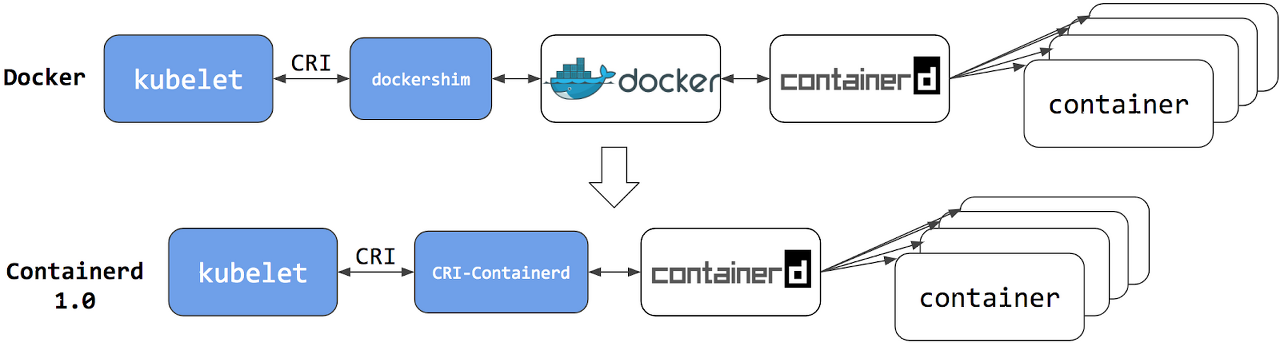
구조
장단점
containerd is a lightweight container runtime, suitable either for limited-resource computing environments or when you’re using a container management system like Kubernetes. Due to its basic interface and lack of ability to build images, it may not be suitable for your development purposes.
중간에 layer가 적기때문에 좀 더 가볍기때문에 제한된 리소스를 써야하는 환경이라면 좀 더 좋을 것이고, 대신 개발 편의성이 떨어진다
Docker offers a full-featured toolkit to build, run, and manage container images and containers in standalone and networked setups. It provides more features than containerd and is more human friendly. Also, Docker uses containerd, which makes it suitable for desktop and continuous integration (CI) build environments. You could use it in production as well if Kubernetes is not available, or if you need isolated network namespaces.
build, run, image관리 등에서 좀 더 편의성이 잘 제공되어있고, CI환경이나 kubernetes환경이 아닌 곳에서 더 편리하게 사용할 수 있다.
Command 차이
docker build, commit, push, run, inspect, ps, image prune...
대부분
crictl로 docker명령어를 대체하는 것이 가능
차이점도 있는데, docker push대신 crictl push는 없고 ctr이라는 containerd 클라이언트 툴을 사용해야 함.
crictl에서는 crictl pods, runp, stopp 와 같은 pod에 좀 더 친화적인 기능을 제공 (도커에선 없는 기능)
docker vs crictl 명령어 비교
| 기능 | docker | crictl | 비고 |
|---|---|---|---|
| 컨테이너 | |||
| 컨테이너 목록 | docker ps | crictl ps | |
| 컨테이너 생성 | docker create | crictl create | |
| 컨테이너 시작 / 정지 | docker start / stop | crictl start / stop | |
| 컨테이너 삭제 | docker rm | crictl rm | |
| 컨테이너 생성 + 실행 | docker run | crictl run | crictl은 컨테이너·Pod 설정 파일(json/yaml)이 필요하다 |
| 컨테이너 안에서 명령 실행 | docker exec | crictl exec | |
| 실행 중인 컨테이너에 연결 | docker attach | crictl attach | |
| 로그 확인 | docker logs | crictl logs | |
| 상세 정보 | docker inspect | crictl inspect | |
| 리소스 사용량 | docker stats | crictl stats | |
| 리소스 제한 변경 | docker update | crictl update | |
| 이미지 | |||
| 이미지 목록 | docker images | crictl images | |
| 이미지 다운로드 | docker pull | crictl pull | |
| 이미지 삭제 | docker rmi | crictl rmi | |
| 이미지 상세 정보 | docker inspect | crictl inspecti | crictl은 이미지용 명령이 따로 있다 |
| 사용하지 않는 이미지 정리 | docker image prune | crictl rmi --prune | |
| 이미지 업로드 | docker push | 없음 | ctr images push 사용 (containerd 클라이언트) |
| 이미지 태그 | docker tag | 없음 | ctr images tag 사용 |
| 이미지 빌드 | docker build | 없음 | crictl은 빌드를 지원하지 않는다. buildah, nerdctl 등 별도 도구 사용 |
| 컨테이너를 이미지로 저장 | docker commit | 없음 | crictl은 지원하지 않는다 |
| Pod (crictl 전용) | |||
| Pod 목록 | 없음 | crictl pods | |
| Pod 실행 | 없음 | crictl runp | Pod 설정 파일로 Pod(sandbox) 생성 |
| Pod 정지 / 삭제 | 없음 | crictl stopp / rmp | |
| Pod 상세 정보 | 없음 | crictl inspectp | |
| Pod 포트 포워딩 | 없음 | crictl port-forward | |
| 시스템 | |||
| 런타임 정보 | docker info | crictl info | |
| 버전 확인 | docker version | crictl version | |
crictl은 Kubernetes 노드의 컨테이너 런타임(CRI)을 점검·디버깅하는 도구라서, 이미지 빌드·업로드 같은 개발용 기능은 없다.- Pod 단위 명령(
pods,runp,stopp등)은 Pod 개념이 없는 docker에는 없다.