💫 목차로 돌아가기
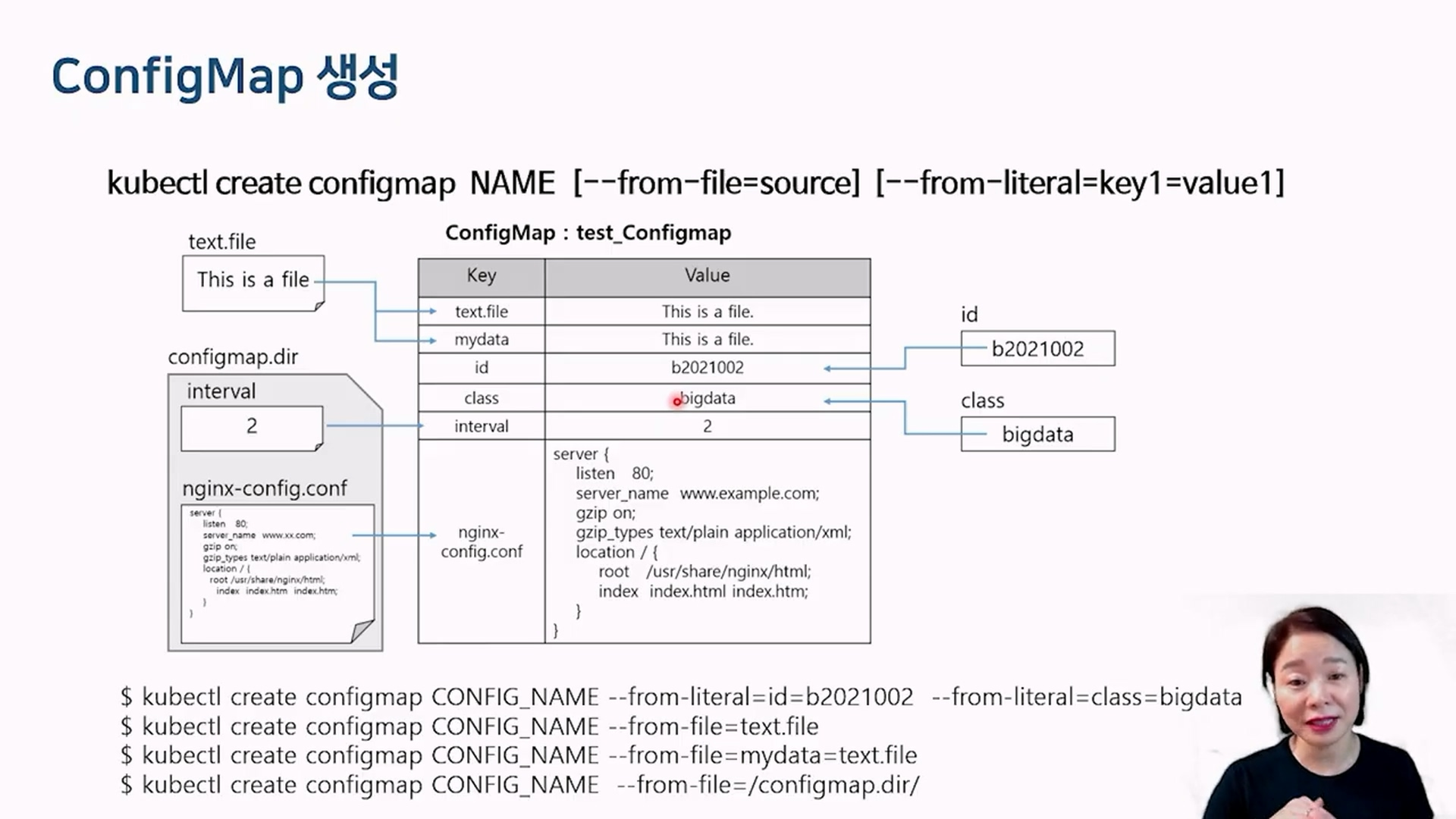
ConfigMap 컨테이너 구성 정보를 한곳에 모아서 관리 ConfigMap 생성 출처 : 유튜브 따배런 따배쿠 https://www.youtube.com/@ttabae-learn #생성예제
#config.dir 디렉토리를 가지고 있고, 이 안에는 nginx-confg.conf 파일이 있다고 가정
kubectl create configmap ttabae-config \
--from-literal=INTERVAL=2 --from-literal=OPTION=boy --from-file=config.dir/
#configmap 조회
kubectl get configmaps
NAME DATA AGE
kube-root-ca.crt 1 11d
ttabae-config 3 26s #<--- 값이 3개 있다고 보임
#실행 후 ttabae-config에는 다음의 값이 들어가 있을 것이다
#INNTERVAL:2
#OPTION:boy
#nginx-config.conf:파일내용 어쩌고저쩌고#configmap 상세조회
kubectl describe configmaps ttabae-config
Name: ttabae-config
Namespace: default
Labels: <none>
Annotations: <none>
Data
====
INTERVAL:
----
2
OPTION:
----
boy
nginx-config.conf:
----
server {
listen 80;
server_name www.example.com;
gzip on;
gzip_types text/plain application/xml;
location / {
root /usr/share/nginx/html;
index index.html index.htm;
}
}
BinaryData
====
Events: <none>
# configMap 수정
kubectl edit configmaps ttabae-config#위에서 만든 configMap의 환경변수 값을 이용하여 pod yaml 파일을 생성
cat genid.yaml
apiVersion: v1
kind: Pod
metadata:
name: genid-stone
spec:
containers:
- image: bluedove97/genid:env
env:
- name: INTERVAL
valueFrom:
configMapKeyRef:
name: ttabae-config #<-- ttabae-config에 있는 INTERVAL 키값를, 환경변수 INTERVAL 에 넣어라.
key: INTERVAL
name: fakeid
volumeMounts:
- name: html
mountPath: /webdata
- image: nginx:1.14
name: web-server
volumeMounts:
- name: html
mountPath: /usr/share/nginx/html
readOnly: true
ports:
- containerPort: 80
volumes:
- name: html
emptyDir: {}#configMap을 통째로 환경변수로 세팅할 때
cat genid-whole.yaml
apiVersion: v1
kind: Pod
metadata:
name: genid-boy
spec:
containers:
- image: bluedove97/genid:env
envFrom: #<--- envFrom : configMap 정의된 전체환경변수를 불러온다.
- configMapRef:
name: ttabae-config
name: fakeid
volumeMounts:
- name: html
mountPath: /webdata
- image: nginx:1.14
name: web-server
volumeMounts:
- name: html
mountPath: /usr/share/nginx/html
readOnly: true
ports:
- containerPort: 80
volumes:
- name: html
emptyDir: {}#ConfigMap의 key를 pod의 컨테이너에 볼륨마운트 하기. (파일로부터 읽어온 환경변수 넘기기)
cat genid-volume.yaml
apiVersion: v1
kind: Pod
metadata:
name: genid-volume
spec:
containers:
- image: bluedove97/genid:env
env:
- name: INTERVAL
valueFrom:
configMapKeyRef:
name: ttabae-config
key: INTERVAL
name: fakeid-generator
volumeMounts:
- name: html
mountPath: /webdata
- image: nginx:1.14
name: web-server
ports:
- containerPort: 80
volumeMounts:
- name: html
mountPath: /usr/share/nginx/html
readOnly: true
- name: config
mountPath: /etc/nginx/conf.d
readOnly: true
volumes:
- name: html
emptyDir: {}
- name: config
configMap:
name: ttabae-config
items:
- key: nginx-config.conf
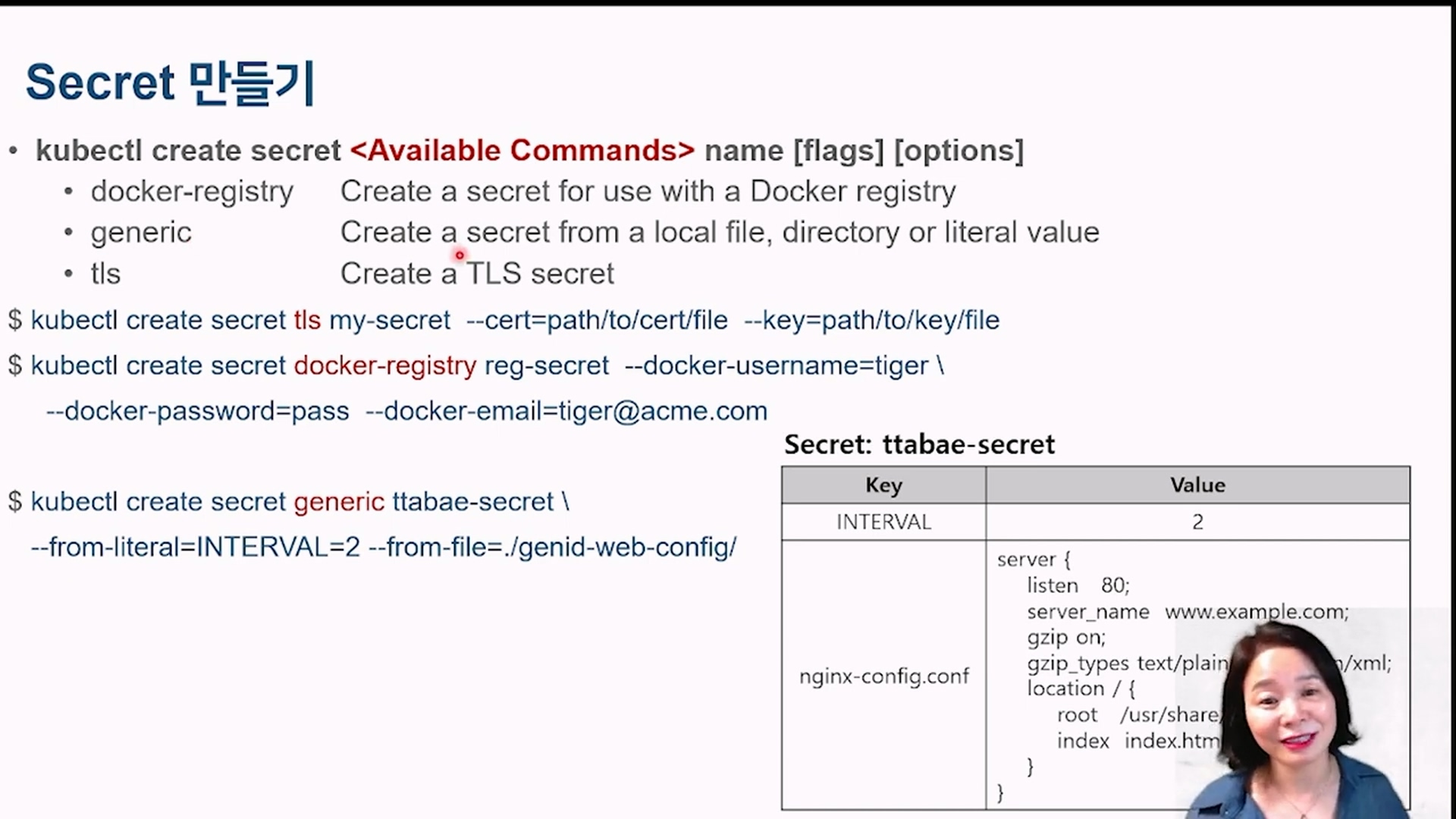
path: nginx-config.confSecret 시크릿은 컨피그맵과 비슷한 맥락이지만, base64로 인코딩해서 모아둔다. docker-registry 도커관련된 변수(이름, 패스워드, 이메일) Secret 만들기 출처 : 유튜브 따배런 따배쿠 https://www.youtube.com/@ttabae-learn #secret 생성
kubectl create secret generic ttabae-secret \
--from-literal=INTERVAL=2 --from-file=./genid-web-config/
#조회
kubectl get secrets
NAME TYPE DATA AGE
ttabae-secret Opaque 2 46s #<--- TYPE Opaque 는 사용자 정의 타입이다
#yaml로 조회 --> base64 인코딩데이터가 보인다.
kubectl get secrets ttabae-secret -o yaml
#secret을 포함한 pod 생성
cat genid-env-secret.yaml
apiVersion: v1
kind: Pod
metadata:
name: genid-env-secret
spec:
containers:
- image: bluedove97/genid:env
env:
- name: INTERVAL
valueFrom:
secretKeyRef:
name: ttabae-secret
key: INTERVAL
name: fakeid-generator
volumeMounts:
- name: html
mountPath: /webdata
- image: nginx:1.14
name: web-server
volumeMounts:
- name: html
mountPath: /usr/share/nginx/html
readOnly: true
ports:
- containerPort: 80
volumes:
- name: html
emptyDir: {}