Kubernetes 설치
이성미강사 실습예제 및 쿠버네티스 설치하기 참고
📓
Virtual Box 세팅
파일 > 환경설정 > 네트워크 > k8sNetwork 생성
hostIP         Port       virtualMachine : port(sshd)
host 127.0.0.1 101 ----> node1 10.100.101.22
host 127.0.0.1 102 ----> node2 10.100.102.22
host 127.0.0.1 104 ----> master 10.100.104.22
❗
도커는 기본적으로 이미 설치가 되어있어야 한다.
도커 실습시 생성한 ubuntu 20.04 버전 vm을 복제해서 master, node1, node2 만들자
도커 실습시 생성한 ubuntu 20.04 버전 vm을 복제해서 master, node1, node2 만들자
- 옵션 : 모든 네트워크 어댑터의 새 MAC주소 생성, 완전한 복제
복제후 네트워크를 k8sNetwork로 세팅 하고
master는 2cpu 3072메모리, node1 2 는 2cpu 2048메모리
구동!
root로 로그인 후
# hosts 세팅
vi /etc/hosts 로 아래 입력 혹은 수정
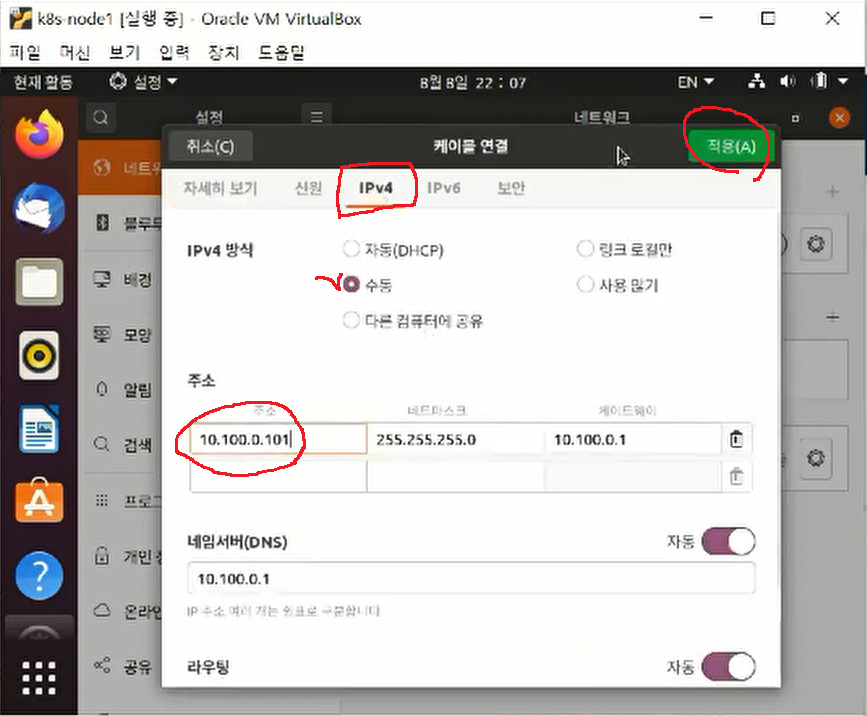
10.100.0.104	master.example.com	master
10.100.0.101	node1.example.com	node1
10.100.0.102	node2.example.com	node2

# hostname 세팅
vi /etc/hostname 로 아래 입력 혹은 수정
master.example.com 혹은 node1.example.com으로 맞는 노드형태로 수정

# 그래픽모드로 재기동(네트워크 설정을 편하게 하기 위해)
systemctl isolate graphical.target
그래픽 모드로 구동 후, guru로 로그인
- 우분투 사용자화면에서 오른쪽 상단 설정 > 네트워크 > 설정 > IPv4에서 IP수정
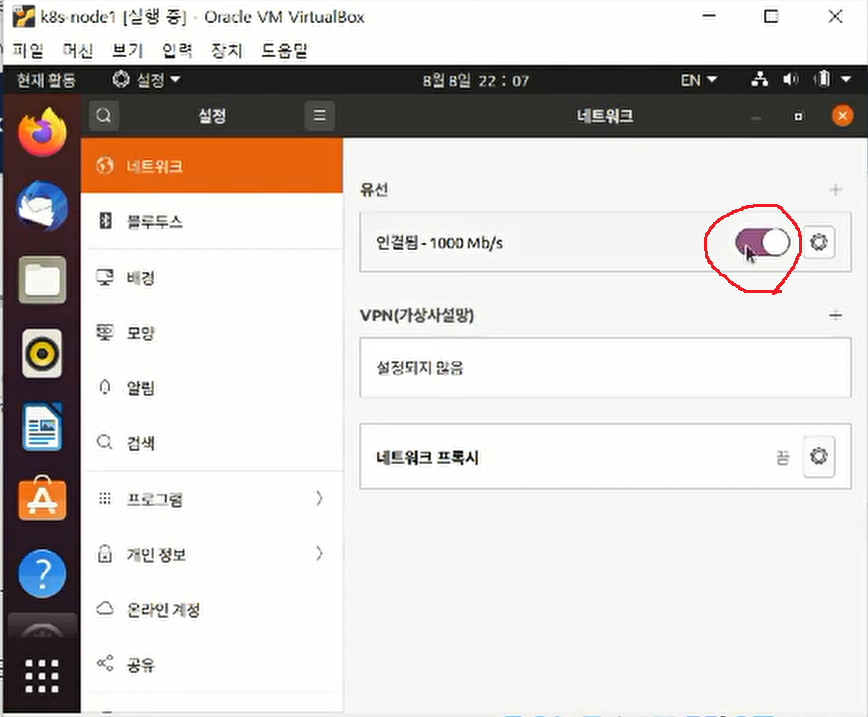
- 네트워크 유선 토글 동작해서 갱신시켜줌
다시 콘솔모드로 세팅 후 재기동
# root 로
$systemctl isolate multi-user.target
Kubernetes 초기 설정
설치시 사용하는 명령은 root에서 실행한다
📓
- Installing kubeadm, kubelet, kubectl
(kubeadm) 쿠버네티스 전체를 관리해주고 운영해주는 커맨드
(kubelet) 쿠버네티스 컨테이너를 조작해주는 데몬
(kubectl) 쿠버네티스에 명령어(ex. 파드조회, 웹서버 3개 실행 등등)를 수해할 때 사용하는 유틸- swap disable 처리 (마스터/노드)
swapoff -a && sed -i '/swap/s/^/#/' /etc/fstab- 노드간 통신을 위한 브릿지 설정 (마스터/노드)
cat <<EOF > /etc/modules-load.d/k8s.conf overlay br_netfilter EOF #모듈 적재 modprobe overlay modprobe br_netfilter cat <<EOF > /etc/sysctl.d/k8s.conf net.bridge.bridge-nf-call-iptables = 1 net.bridge.bridge-nf-call-ip6tables = 1 net.ipv4.ip_forward = 1 EOF #Apply sysctl params without reboot sysctl --system- 방화벽제거 (마스터/노드)
#방화벽 데몬 세팅 안되어있다면 무시 systemctl stop firewalld systemctl disable firewalld- 필수 패키지 apt-get (마스터/노드)
apt-get update apt-get install -y apt-transport-https ca-certificates curl- 구글 클라우드 퍼블릭 키 다운로드 (마스터/노드)
curl -fsSLo /usr/share/keyrings/kubernetes-archive-keyring.gpg https://packages.cloud.google.com/apt/doc/apt-key.gpg- 레파지토리에 쿠버네티스관련 등록 (마스터/노드)
echo "deb [signed-by=/usr/share/keyrings/kubernetes-archive-keyring.gpg] https://apt.kubernetes.io/ kubernetes-xenial main" | sudo tee /etc/apt/sources.list.d/kubernetes.list- 레파지토리 업데이트 후 kubelet kubeadm kubectl 설치 (마스터/노드)
apt-get update apt-get install -y kubelet kubeadm kubectl apt-mark hold kubelet kubeadm kubectl- 큐블렛 실행 및 인에이블 (마스터/노드)
systemctl start kubelet systemctl enable kubelet- systemd와 cgroup 맞춰 줘야함 (마스터/노드)
#Kubernetes 1.22버전부터는 systemd와 cgroup 맞춰 줘야함
mkdir /etc/docker
cat <<EOF > /etc/docker/daemon.json
{
  "exec-opts": ["native.cgroupdriver=systemd"],
  "log-driver": "json-file",
  "log-opts": {
    "max-size": "100m"
  },
  "storage-driver": "overlay2"
}
EOF


systemctl enable docker
systemctl daemon-reload
systemctl restart docker
- master component 초기화 (😡반드시 master에서 실행‼️)
kubeadm init
# 혹은 kubeadm init --apiserver-advertise-address 10.100.0.104 --pod-network-cidr=10.100.0.0/24
👿💢 아래와 같은 에러가 발생했다면
https://musclebear.tistory.com/165 에서 에러 증상 해결 참고
[init] Using Kubernetes version: v1.25.4
[preflight] Running pre-flight checks
error execution phase preflight: [preflight] Some fatal errors occurred:
	[ERROR CRI]: container runtime is not running: output: E1124 13:32:42.667699    9266 remote_runtime.go:948] "Status from runtime service failed" err="rpc error: code = Unimplemented desc = unknown service runtime.v1alpha2.RuntimeService"
time="2022-11-24T13:32:42+09:00" level=fatal msg="getting status of runtime: rpc error: code = Unimplemented desc = unknown service runtime.v1alpha2.RuntimeService"
, error: exit status 1
[preflight] If you know what you are doing, you can make a check non-fatal with `--ignore-preflight-errors=...`
To see the stack trace of this error execute with --v=5 or higher
rm /etc/containerd/config.toml
systemctl restart containerd
kubeadm init
- token값 저장 (마스터에서 저장후 노드에서 사용)
kubeadm 설치완료 후 화면에 있는 kubeadm token값을 token.txt로 임시저장
(타 node에서 사용해야 함)
- kubectl 사용 권한 설정 (마스터/노드)
#root 권한 유저에게 설정
mkdir -p $HOME/.kube
sudo cp -i /etc/kubernetes/admin.conf $HOME/.kube/config
sudo chown $(id -u):$(id -g) $HOME/.kube/config

#guru 유저에게도 kubectl권한 설정하려면, guru 로그인 상태로 실행
su - guru
mkdir -p $HOME/.kube
sudo cp -i /etc/kubernetes/admin.conf $HOME/.kube/config
sudo chown $(id -u):$(id -g) $HOME/.kube/config
- Installing a Pod network add-on (마스터)
(Weave Net 으로 설치해본다)
kubectl apply -f https://github.com/weaveworks/weave/releases/download/v2.8.1/weave-daemonset-k8s.yaml
- node 동작확인 (마스터)
kubectl get nodes
NAME                 STATUS   ROLES           AGE   VERSION
master.example.com   Ready    control-plane   57m   v1.25.4
- 워커노드들 조인 ( ‼️node1, node2에서 실행)
master에 저장해뒀던 kubeadm token값을 node에서 실행
kubectl get nodes
NAME                 STATUS   ROLES           AGE   VERSION
master.example.com   Ready    control-plane   57m   v1.25.4
👿💢 아래와 같은 에러가 발생했다면
[preflight] Running pre-flight checks
error execution phase preflight: [preflight] Some fatal errors occurred:
	[ERROR CRI]: container runtime is not running: output: E1124 14:46:10.087714   11613 remote_runtime.go:948] "Status from runtime service failed" err="rpc error: code = Unimplemented desc = unknown service runtime.v1alpha2.RuntimeService"
time="2022-11-24T14:46:10+09:00" level=fatal msg="getting status of runtime: rpc error: code = Unimplemented desc = unknown service runtime.v1alpha2.RuntimeService"
, error: exit status 1
[preflight] If you know what you are doing, you can make a check non-fatal with `--ignore-preflight-errors=...`
To see the stack trace of this error execute with --v=5 or higher
rm /etc/containerd/config.toml
systemctl restart containerd
#이후 다시 노드연결 재시도
- node 동작확인 (마스터)
kubectl get nodes
NAME                 STATUS   ROLES           AGE     VERSION
master.example.com   Ready    control-plane   72m     v1.25.4
node1.example.com    Ready    <none>          7m45s   v1.25.4
node2.example.com    Ready    <none>          65s     v1.25.4
- kubectl, kubeadm 자동완성 명령어 설정하기(마스터)
#kubectl 명령어 자동완성 설정
source /usr/share/bash-completion/bash_completion
echo 'source <(kubectl completion bash)' >>~/.bashrc

#kubeadm 자동완성 명령어 설정
source /usr/share/bash-completion/bash_completion
echo 'source <(kubeadm completion bash)' >>~/.bashrc